Processing 설치
Processing 설치
Processing은 그림을 그리는 코드를 바로 실행해 보는 프로그램입니다. 3회차(9월 5일, 이정섭 강사)에서 관객의 몸과 움직임에 반응하는 작품을 만들 때 씁니다. 수업 전에 집에서 설치해 오세요. 프로그램 500MB에 아래 라이브러리 570MB까지, 1GB가 넘게 받아야 해서 현장 와이파이로는 오래 걸립니다.
내 컴퓨터 확인
- Windows — 요즘 노트북은 거의 다 64비트입니다. 그대로 진행하면 됩니다.
- Mac — 왼쪽 위 사과 메뉴 → 이 Mac에 관하여. 「칩」에 Apple M1/M2/M3/M4 가 보이면 Apple Silicon, 「프로세서」에 Intel 이 보이면 Intel입니다. 둘 중 어느 쪽인지 기억해 두세요.
내려받기
processing.org/download 에서 내 컴퓨터에 맞는 파일을 받습니다. 지금 버전은 4.5.6 입니다.
| 컴퓨터 | 받을 파일 |
|---|---|
| Windows | Windows (Intel 64-bit) 의 설치 파일(.msi) |
| Mac, Apple Silicon | macOS (Apple Silicon) 의 .dmg |
| Mac, Intel | macOS (Intel 64-bit) 의 .dmg |
설치
Windows
- 받은
.msi파일을 더블클릭합니다. - 옵션은 전부 기본값 그대로 Next, 마지막에 Install.
- 「Windows의 PC 보호」 파란 창이 뜨면 추가 정보 → 실행.
- 시작 메뉴에서 Processing 을 찾아 실행합니다.
Mac
- 받은
.dmg파일을 더블클릭합니다. - 열린 창에서 Processing 아이콘을 Applications 폴더로 끌어다 놓습니다.
- 응용 프로그램 폴더에서 Processing을 실행합니다.
확인
Processing을 열면 흰 편집 창이 하나 뜹니다. 아래 코드를 복사해 붙여 넣고 왼쪽 위 ▶ (Run) 을 누르세요. 끌 때는 ■ (Stop) 이나 창 닫기.
이 코드가 만드는 정원입니다:
영상처럼 나무가 자라고 가지 끝에 전구가 켜지면 설치가 잘 된 것입니다. 마우스를 움직이면 정원을 빙 둘러볼 수 있고, 나무는 천천히 보는 사람 쪽을 향해 자랍니다. R은 새 나무, M은 소리 켜고 끄기, S는 화면 저장, V는 녹화입니다.
// 회로 정원.
// 나무 한 그루가 빛을 찾아 자랍니다. 공중의 빛 알갱이를 향해 가지를 뻗고, 닿은 빛은 사라집니다.
// 새 빛은 관객(카메라) 쪽에 더 많이 생기므로 나무는 보는 사람을 향해 자랍니다.
// 더 자랄 곳이 없는 가지 끝에는 전구가 켜집니다. 다 자란 나무는 전구가 꺼지고 잎이 지고 먹이 마릅니다.
//
// 공간 점유 알고리즘(Runions, Lane, Prusinkiewicz 2007).
// OpenProcessing 의 Peter Jacobs, "Procedural Tree in 3D"(CC BY-SA) 를 바탕으로 다시 썼습니다.
//
// 소리: 자바에 내장된 신시사이저(Gervill)가 data/ 폴더의 사운드폰트로 연주합니다.
// 전구가 켜질 때 피아노 한 음, 계절마다 바뀌는 화음의 패드, 빛이 닿을 때 첼레스타 한 알, 나무가 질 때 낮은 피아노.
//
// 마우스: 정원 둘레를 돕니다. 휠: 다가가거나 물러납니다. 클릭: 관객 쪽에 빛을 한 줌.
// 키: R 새 나무, V 녹화 시작/멈춤, S 한 장 저장, M 소리 끄기/켜기.

import javax.sound.midi.*;

color PAPER = #FAF8F3;
color INK = #14141A;
color LEAF = #8DB34A;
color LIGHT = #E0A020;
color[] palette = { #2F6BFF, #FFD23F, #E68BC5, #8DB34A };

float STEP = 10;       // 가지가 한 번에 자라는 길이
float REACH = 150;     // 이 거리 안의 빛만 가지를 끌어당긴다
float KILL = 22;       // 이 거리 안에 들어온 빛은 닿은 것으로 치고 사라진다
int MAX_NODES = 3200;  // 나무의 최대 크기. 넘으면 한 철이 끝난다
int MAX_LIGHTS = 600;  // 공중에 떠 있는 빛의 최대 수

ArrayList<Node> nodes = new ArrayList<Node>();
ArrayList<PVector> lights = new ArrayList<PVector>();
int stall = 0;         // 자라지 못한 프레임 수
float fade = 0;        // 0 선명, 1 사라짐
boolean dying = false;

PVector eye = new PVector();
float camYaw = 0, camPitch = 0.5, camDist = 1000, zoom = 1000, orbit = 0, idle = 0;
boolean recording = false;

// 소리. 계절(나무 한 그루)마다 화음과 음계가 바뀐다
String SOUNDFONT = "MuseScore_General.sf2";
int[] ROOTS = { 60, 57, 53, 55 };                                           // C, A, F, G
int[][] CHORDS = { {0, 4, 7, 11}, {0, 3, 7, 10}, {0, 4, 7, 11}, {0, 4, 7, 9} };
int[][] SCALES = { {0, 2, 4, 7, 9}, {0, 3, 5, 7, 10}, {0, 2, 4, 7, 9}, {0, 2, 4, 7, 9} };
Synthesizer synth;
MidiChannel piano, pad, bell;
boolean sound = false, muted = false;
int season = -1, pending = -1, lastBell = -100;
ArrayList<int[]> ringing = new ArrayList<int[]>();  // {채널, 음, 끌 프레임}

void setup() {
  size(1280, 720, P3D);
  frameRate(30);
  smooth(8);
  surface.setTitle("회로 정원 · OPEN CIRCUIT BUSAN");
  soundSetup();
  plant();
}

// 새 나무. 줄기 한 뼘과 빛 구름
void plant() {
  nodes.clear();
  lights.clear();
  nodes.add(new Node(new PVector(0, 0, 0), null));
  for (int i = 1; i <= 6; i++) {
    nodes.add(new Node(new PVector(0, -STEP * i, 0), nodes.get(i - 1)));
  }
  for (int i = 0; i < 350; i++) lights.add(lightAt(false));
  stall = 0;
  fade = 0;
  dying = false;
  newSeason();
}

// 공중 어딘가의 빛 한 알. toEye 면 관객이 있는 쪽에 치우친다
PVector lightAt(boolean toEye) {
  while (true) {
    PVector p = PVector.random3D().mult(pow(random(1), 1 / 3.0) * 300);
    p.y = p.y * 0.8 - 270;
    if (p.y > -50) continue;
    if (toEye) {
      float side = (p.x * eye.x + p.z * eye.z) / (sqrt(p.x * p.x + p.z * p.z) * sqrt(eye.x * eye.x + eye.z * eye.z) + 1);
      if (random(1) > 0.5 + 0.5 * side) continue;
    }
    return p;
  }
}

void keyPressed() {
  if (key == 'r' || key == 'R') {
    restart();
  } else if (key == 'v' || key == 'V') {
    recording = !recording;
    surface.setTitle(recording ? "회로 정원 ● REC" : "회로 정원 · OPEN CIRCUIT BUSAN");
  } else if (key == 's' || key == 'S') {
    saveFrame("garden-######.png");
  } else if (key == 'm' || key == 'M') {
    muted = !muted;
    if (sound) for (MidiChannel ch : synth.getChannels()) ch.controlChange(7, muted ? 0 : 100);
  }
}

void mousePressed() {
  for (int i = 0; i < 40 && lights.size() < MAX_LIGHTS; i++) lights.add(lightAt(true));
}

void mouseWheel(MouseEvent event) {
  zoom = constrain(zoom + event.getCount() * 60, 450, 1800);
}

void draw() {
  background(PAPER);

  // 관객. 마우스를 부드럽게 따라 돌고, 가만두면 저절로 천천히 돈다
  idle = (mouseX == pmouseX && mouseY == pmouseY) ? idle + 1 : 0;
  if (idle > 90) orbit += 0.0025;
  camYaw = lerp(camYaw, map(mouseX, 0, width, -PI, PI) + orbit, 0.04);
  camPitch = lerp(camPitch, map(mouseY, 0, height, 1.0, 0.1), 0.04);
  camDist = lerp(camDist, zoom, 0.08);
  eye.set(cos(camYaw) * cos(camPitch) * camDist, -sin(camPitch) * camDist, sin(camYaw) * cos(camPitch) * camDist);
  camera(eye.x, eye.y, eye.z, 0, -230, 0, 0, 1, 0);

  // 땅. 가운데가 아주 조금 어둡다
  noStroke();
  for (int i = 5; i >= 1; i--) {
    pushMatrix();
    translate(0, -0.1 * (6 - i), 0);
    rotateX(HALF_PI);
    fill(lerpColor(PAPER, INK, 0.012 * (6 - i)));
    circle(0, 0, 640 * i / 5.0);
    popMatrix();
  }

  // 빛이 조금씩 새로 생긴다. 관객 쪽에 더 많이
  if (!dying && frameCount % 2 == 0 && lights.size() < MAX_LIGHTS) lights.add(lightAt(true));

  if (!dying) grow();
  if (!dying && (nodes.size() > MAX_NODES || stall > 240)) {
    dying = true;
    play(piano, ROOTS[season] - 24, 34, 240);   // 나무가 질 때 낮은 피아노 한 음
  }
  if (dying) {
    fade += 1 / 240.0;
    if (fade >= 1) plant();
  }

  weigh();
  for (Node n : nodes) n.showShadow();
  for (Node n : nodes) n.showBranch();
  for (Node n : nodes) n.showLeaf();
  showLights();

  // 전구는 깊이 검사를 끄고 맨 위에 그린다. 빛무리와 전구가 겹쳐 떨리지 않도록
  hint(DISABLE_DEPTH_TEST);
  for (Node n : nodes) n.showLamp();
  hint(ENABLE_DEPTH_TEST);

  soundUpdate();
  if (recording) saveFrame("frames/######.png");
}

// 공간 점유 알고리즘의 한 걸음
void grow() {
  // 1. 빛마다 가장 가까운 가지를 찾아 끌어당긴다. 충분히 가까우면 빛은 닿은 것
  for (int i = lights.size() - 1; i >= 0; i--) {
    PVector l = lights.get(i);
    Node near = null;
    float best = REACH;
    for (Node n : nodes) {
      float d = PVector.dist(l, n.pos);
      if (d < best) {
        best = d;
        near = n;
      }
    }
    if (near == null) continue;
    if (best < KILL) {
      lights.remove(i);
      if (frameCount - lastBell > 14 && random(1) < 0.5) {   // 빛이 닿으면 가끔 첼레스타 한 알
        lastBell = frameCount;
        play(bell, ROOTS[season] + 24 + SCALES[season][int(random(5))] + (random(1) < 0.5 ? 12 : 0), int(random(16, 26)), 60);
      }
      continue;
    }
    near.pull.add(PVector.sub(l, near.pos).normalize());
    near.pulls++;
  }

  // 2. 끌린 가지는 그쪽으로 한 걸음 자란다. 조금 흔들리고, 조금은 위로
  int grew = 0;
  int count = nodes.size();
  for (int i = 0; i < count; i++) {
    Node n = nodes.get(i);
    if (n.pulls == 0) continue;
    n.pull.div(n.pulls).add(PVector.random3D().mult(0.25)).add(0, -0.08, 0).normalize().mult(STEP);
    nodes.add(new Node(PVector.add(n.pos, n.pull), n));
    n.kids++;
    n.pull.set(0, 0, 0);
    n.pulls = 0;
    grew++;
  }
  stall = grew == 0 ? stall + 1 : 0;
}

// 파이프 규칙. 가지의 단면적은 그 위에 달린 가지 끝의 수
void weigh() {
  for (Node n : nodes) n.area = 0;
  for (int i = nodes.size() - 1; i >= 0; i--) {
    Node n = nodes.get(i);
    if (n.area == 0) n.area = 1;
    if (n.parent != null) n.parent.area += n.area;
  }
}

// 소리 준비. 사운드폰트가 없으면 자바 기본 음색으로, 소리 장치가 없으면 소리 없이 간다
void soundSetup() {
  try {
    synth = MidiSystem.getSynthesizer();
    synth.open();
    File sf = new File(dataPath(SOUNDFONT));
    if (sf.exists()) {
      Soundbank bank = MidiSystem.getSoundbank(sf);
      if (synth.getDefaultSoundbank() != null) synth.unloadAllInstruments(synth.getDefaultSoundbank());
      synth.loadAllInstruments(bank);
      println("사운드폰트: " + bank.getName());
    } else {
      println("data/" + SOUNDFONT + " 가 없어 자바 기본 음색으로 연주합니다");
    }
    MidiChannel[] ch = synth.getChannels();
    piano = ch[0];
    pad = ch[1];
    bell = ch[2];
    piano.programChange(0);    // 그랜드 피아노
    pad.programChange(89);     // 따뜻한 패드
    bell.programChange(8);     // 첼레스타
    piano.controlChange(91, 110);   // 리버브
    pad.controlChange(91, 127);
    bell.controlChange(91, 120);
    pad.controlChange(73, 110);     // 느린 어택
    pad.controlChange(72, 110);     // 긴 릴리즈
    sound = true;
  } catch (Exception e) {
    println("소리 없이 진행합니다: " + e);
  }
}

// 처음부터. 나무도 음악도 첫 계절로 돌아간다
void restart() {
  if (sound) {
    for (MidiChannel ch : synth.getChannels()) ch.allNotesOff();
    ringing.clear();
    pending = -1;
  }
  season = -1;
  plant();
}

// 새 계절. 패드의 화음이 바뀐다
void newSeason() {
  season = (season + 1) % ROOTS.length;
  if (!sound) return;
  pad.allNotesOff();
  for (int i : CHORDS[season]) pad.noteOn(ROOTS[season] - 12 + i, 40);
}

// 한 음. 정해진 프레임 뒤에 끈다
void play(MidiChannel ch, int note, int vel, int frames) {
  if (!sound) return;
  ch.noteOn(note, vel);
  ringing.add(new int[] { ch == piano ? 0 : ch == pad ? 1 : 2, note, frameCount + frames });
}

// 전구가 켜지면 피아노 한 음을 예약한다. 음높이는 전구의 색과 높이에서
void ask(Node n) {
  int oct = int(map(n.pos.y, -50, -570, 0, 2.99));
  pending = ROOTS[season] + SCALES[season][n.ci] + 12 * oct;
}

// 매 프레임. 예약된 음은 8 프레임 격자에 맞춰 하나씩만 치고, 다 울린 음은 끈다
void soundUpdate() {
  if (!sound) return;
  if (pending >= 0 && frameCount % 8 == 0) {
    play(piano, pending, int(random(38, 58)), 120);
    pending = -1;
  }
  if (frameCount % 10 == 0) {
    pad.controlChange(11, int(map(nodes.size(), 0, MAX_NODES, 45, 100) * (1 - lampFade())));
  }
  MidiChannel[] chs = { piano, pad, bell };
  for (int i = ringing.size() - 1; i >= 0; i--) {
    int[] r = ringing.get(i);
    if (frameCount >= r[2]) {
      chs[r[0]].noteOff(r[1]);
      ringing.remove(i);
    }
  }
}

void exit() {
  if (synth != null) synth.close();
  super.exit();
}

// 나무가 아직 닿지 못한 빛. 반딧불처럼 조금씩 떠다닌다
void showLights() {
  strokeWeight(3);
  stroke(LIGHT, 150 * (1 - fade));
  for (PVector l : lights) {
    point(l.x + 2 * sin(frameCount * 0.05 + l.z), l.y + 2 * cos(frameCount * 0.04 + l.x), l.z);
  }
}

// 멀면 옅게. 종이 위의 공기
float depthOf(PVector p) {
  return map(constrain(PVector.dist(eye, p), camDist - 500, camDist + 500), camDist - 500, camDist + 500, 1, 0.45);
}

// 바람. 높을수록 크게 흔들린다. 그리기에만 쓰고 자라는 계산에는 쓰지 않는다
PVector swayed(PVector p) {
  float s = sin(frameCount * 0.03 + p.y * 0.004) * p.y * -0.02;
  return new PVector(p.x + s, p.y, p.z + s * 0.4);
}

// 나무가 지는 순서. 전구가 먼저 꺼지고, 잎이 지고, 마지막에 먹이 마른다
float lampFade() {
  return constrain(fade / 0.3, 0, 1);
}
float leafFall() {
  return constrain((fade - 0.2) / 0.5, 0, 1);
}
float inkFade() {
  return constrain((fade - 0.4) / 0.6, 0, 1);
}

class Node {
  PVector pos, pull = new PVector();
  Node parent;
  int pulls = 0, kids = 0, born, depth;
  float area = 0, phase;
  int ci;
  color c;
  boolean leafy, lampy;

  Node(PVector pos, Node parent) {
    this.pos = pos;
    this.parent = parent;
    depth = parent == null ? 0 : parent.depth + 1;
    born = frameCount;
    ci = int(random(palette.length));
    c = palette[ci];
    phase = random(TWO_PI);
    leafy = random(1) < 0.3;
    lampy = random(1) < 0.5;
  }

  float depth() {
    return depthOf(pos);
  }

  // 갓 난 가지는 며칠에 걸쳐 돋는다
  float grown() {
    return constrain((frameCount - born) / 6.0, 0, 1);
  }

  float weight() {
    return min(11, 0.6 + sqrt(area) * 0.32);
  }

  // 잔가지 끝인가. 줄기나 굵은 가지에 바로 붙은 짧은 곁가지는 아니다
  boolean onTwig() {
    if (depth < 12) return false;
    Node p = parent;
    for (int i = 0; i < 4 && p != null; i++) {
      if (p.area > 10) return false;
      p = p.parent;
    }
    return true;
  }

  void showShadow() {
    if (parent == null) return;
    PVector a = swayed(parent.pos);
    PVector b = PVector.lerp(a, swayed(pos), grown());
    stroke(INK, 14 * (1 - inkFade()));
    strokeWeight(weight());
    line(a.x + a.y * 0.45, -0.7, a.z + a.y * 0.25, b.x + b.y * 0.45, -0.7, b.z + b.y * 0.25);
  }

  void showBranch() {
    if (parent == null) return;
    PVector a = swayed(parent.pos);
    PVector b = PVector.lerp(a, swayed(pos), grown());
    stroke(INK, 255 * depth() * (1 - inkFade()));
    strokeWeight(weight());
    line(a.x, a.y, a.z, b.x, b.y, b.z);
  }

  // 잎. 나무가 질 때는 흔들리며 떨어진다
  void showLeaf() {
    if (!leafy || area > 3 || !onTwig() || grown() < 1) return;
    float fall = leafFall();
    PVector p = swayed(pos);
    PVector d = PVector.sub(pos, parent.pos);
    pushMatrix();
    translate(p.x + 30 * fall * sin(frameCount * 0.08 + phase), p.y + fall * fall * 320, p.z);
    rotateY(atan2(d.x, d.z) + fall * 4 * sin(frameCount * 0.05 + phase));
    rotateX(phase < PI ? 1.2 : -1.2);
    noStroke();
    fill(LEAF, 255 * depth() * (1 - constrain((fall - 0.7) / 0.3, 0, 1)));
    ellipse(6, 0, 12, 6);
    popMatrix();
  }

  // 전구. 더 자라지 않은 잔가지 끝에만 켜지고, 항상 관객을 향한 납작한 원이라 그림처럼 보인다
  void showLamp() {
    if (!lampy || kids > 0 || !onTwig()) return;
    float age = frameCount - born;
    if (age < 30) return;
    if (age == 30 && !dying) ask(this);
    float open = constrain((age - 30) / 40.0, 0, 1) * (1 - lampFade());
    if (open <= 0) return;
    float d = 14 * open * (1 + 0.06 * sin(frameCount * 0.05 + phase));
    float a = 255 * depth();
    PVector p = swayed(pos);
    pushMatrix();
    translate(p.x, p.y, p.z);
    rotateY(HALF_PI - camYaw);
    rotateX(camPitch);
    noStroke();
    fill(c, a * 0.10);
    circle(0, 0, d * 3.4);
    fill(c, a * 0.22);
    circle(0, 0, d * 2.0);
    stroke(INK, a);
    strokeWeight(1.6);
    fill(c, a);
    circle(0, 0, d);
    popMatrix();
  }
}
라이브러리 설치
3회차에서 쓰는 라이브러리 네 개입니다. 이정섭 강사가 미리 설치를 권했습니다. Processing 본체와 따로, 프로그램 안에서 받습니다.
| 검색어 | 목록에서 고를 것 | 만든 곳 | 크기 |
|---|---|---|---|
video | Video Library for Processing 4 | The Processing Foundation | 약 310MB |
opencv | OpenCV for Processing | Greg Borenstein, Florian Bruggisser | 약 250MB |
blob | BlobDetection | Julien 'v3ga' Gachadoat | 0.1MB 미만 |
sound | Sound | The Processing Foundation | 약 7MB |
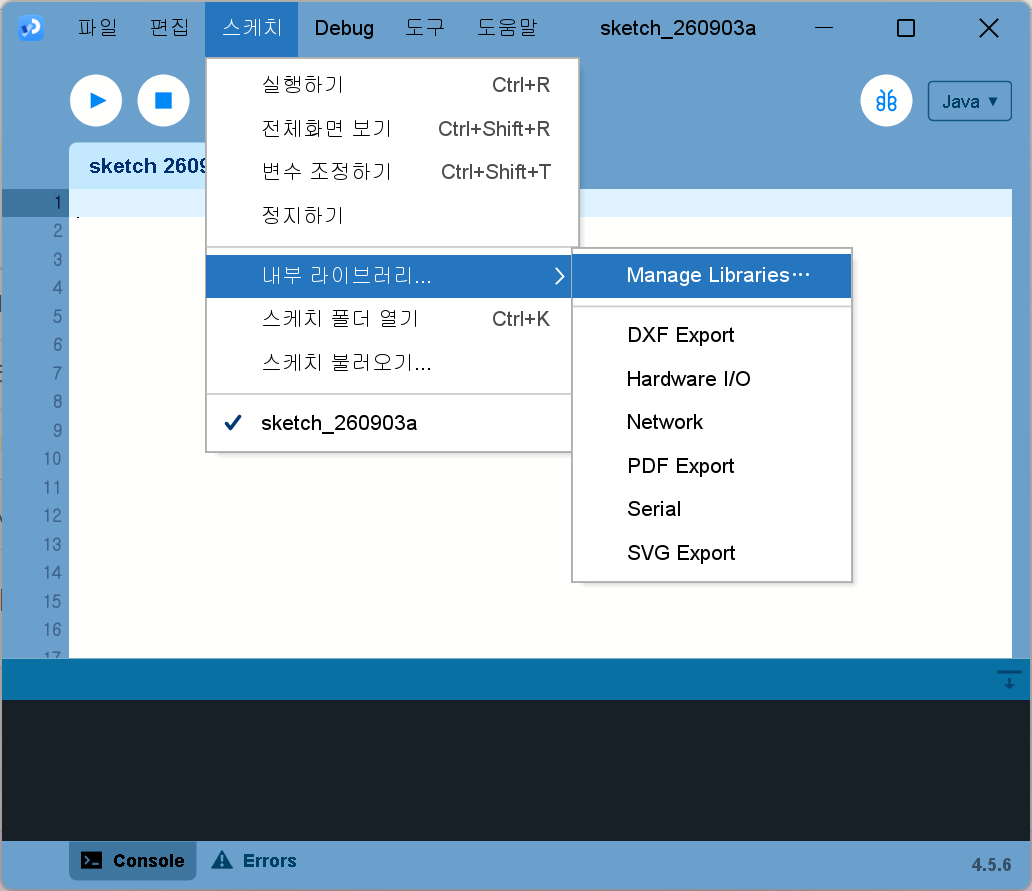
- Processing을 열고 메뉴 Sketch → Import Library… → Manage Libraries… 를 누릅니다. 메뉴가 한글로 나오면 스케치 → 내부 라이브러리… → Manage Libraries… 입니다.
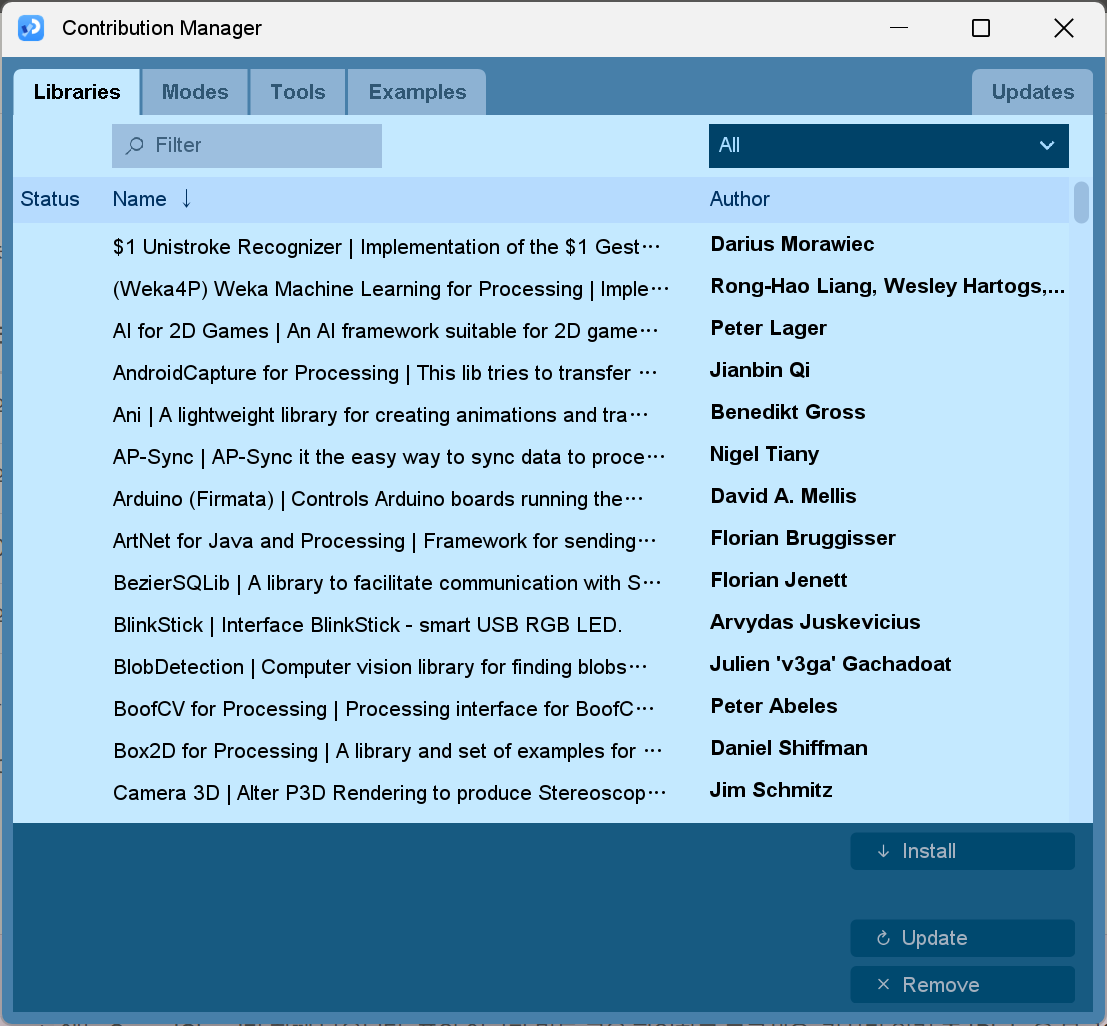
- 「Contribution Manager」 창이 Libraries 탭으로 열립니다. 왼쪽 위 Filter 칸에 표의 검색어를 칩니다.
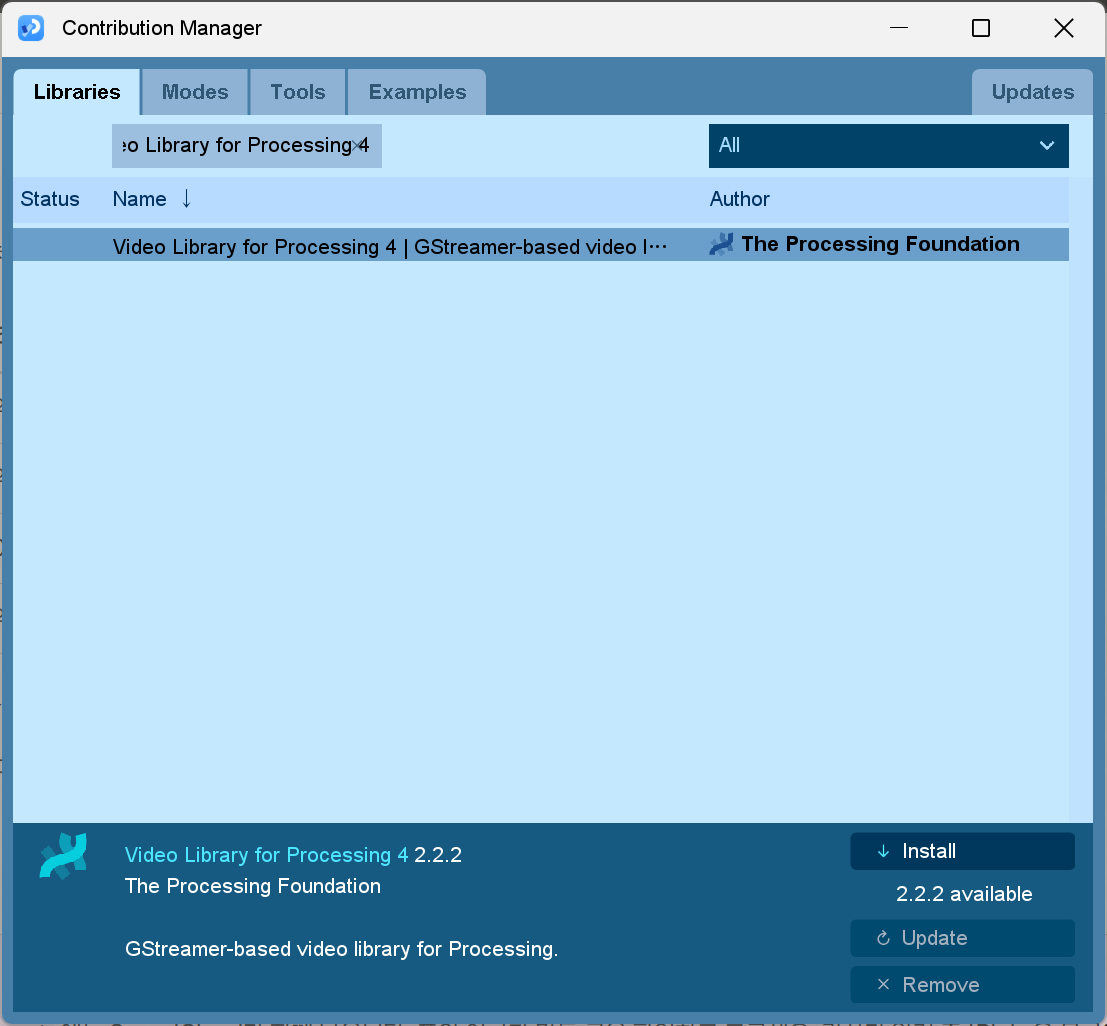
- 남은 목록에서 이름을 한 번 누릅니다. 창 아래에 이름·버전·만든 곳·설명이 나옵니다. 표와 맞으면 오른쪽 아래 Install.
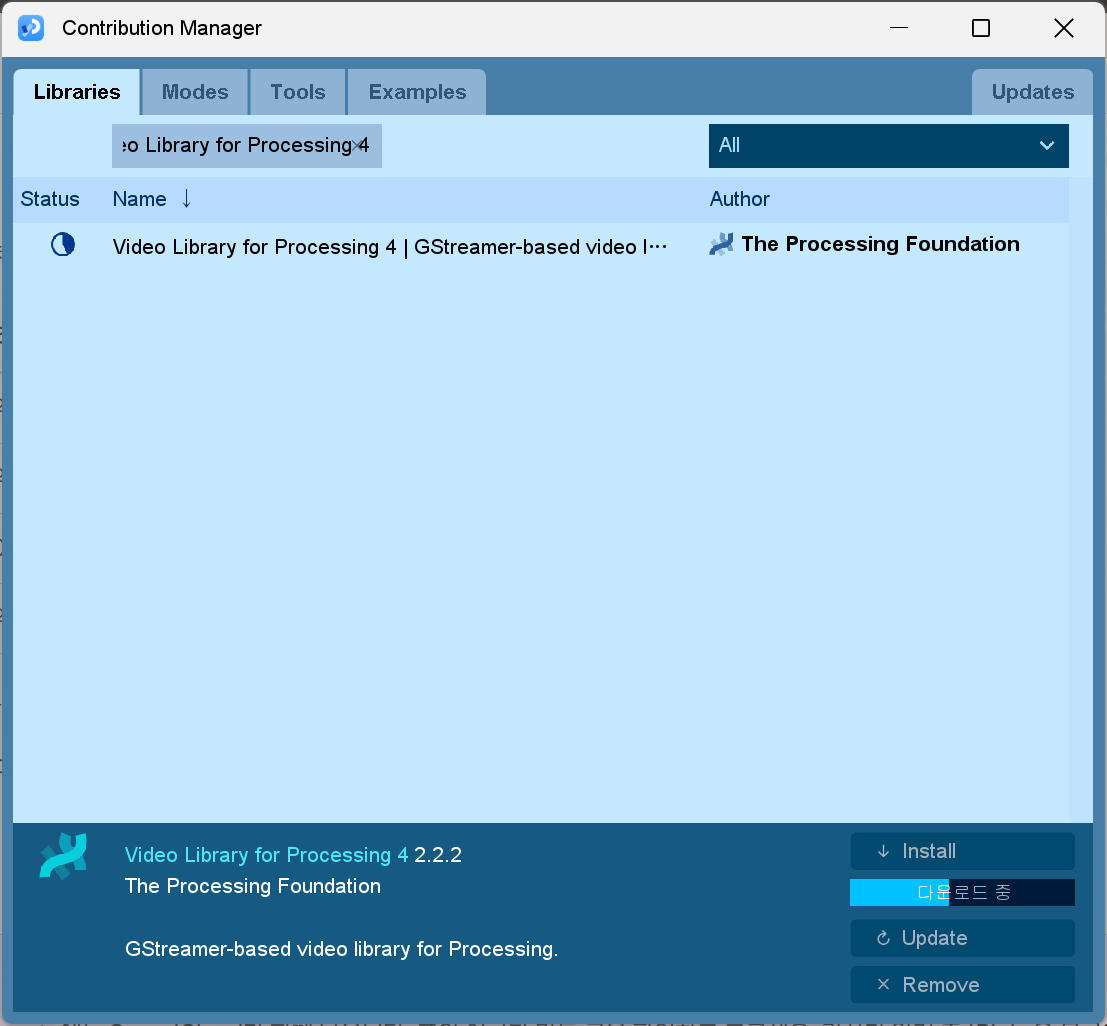
- 받는 동안에는 Install 밑에 파란 진행 막대와 「다운로드 중」이 나옵니다. 다 되면 왼쪽 Status 칸에 표시가 남습니다.
- 네 개를 차례로 설치한 뒤 창을 닫고 Processing을 껐다 켭니다.
네 개가 다 됐는지 보기
File → New 로 새 스케치를 열고 아래를 붙여 넣은 뒤 ▶ 를 누릅니다. 작은 창에 전구 네 개가 뜹니다. 넷 다 초록이면 끝입니다. 빨간 전구가 있으면 그 라이브러리가 아직 안 된 것이고, 까닭은 아래 검은 칸(콘솔)에 한글로 찍힙니다. 소리는 나지 않습니다.
// 라이브러리 확인. 네 개를 하나씩 실제로 열어 보고 전구를 켠다.
// 초록 전구는 준비된 것, 빨간 전구는 아직 안 된 것. 까닭은 아래 콘솔에 찍힌다.
// 창에 보이는 글이 영어인 것은 Processing 기본 글꼴에 한글이 없어서다. 소리는 나지 않는다.

import processing.video.*;
import gab.opencv.*;
import blobDetection.*;
import processing.sound.*;

color PAPER = #FAF8F3;
color INK = #14141A;
color GREEN = #8DB34A;
color RED = #E0533F;

String[] names = { "Video", "OpenCV", "Blob", "Sound" };
String[] said = new String[4];    // 라이브러리가 대답한 값
boolean[] ready = new boolean[4];

void setup() {
  size(520, 320);
  smooth(8);
  surface.setTitle("Library check · OPEN CIRCUIT BUSAN");

  for (int i = 0; i < names.length; i++) {
    try {
      said[i] = open(i);
      ready[i] = true;
      println(names[i] + " 준비됨 · " + said[i]);
    } catch (Throwable e) {
      said[i] = "not ready";
      ready[i] = false;
      println(names[i] + " 안 됨 · " + e);
    }
  }
  println(lit() == names.length
    ? "네 개 모두 준비됐습니다"
    : "빨간 전구가 켜진 라이브러리를 단톡방에 알려 주세요");
  noLoop();
}

// 라이브러리를 하나씩 실제로 열어 본다. 설치가 덜 됐으면 여기서 걸린다
String open(int i) {
  if (i == 0) {
    return "cameras: " + Capture.list().length;
  }
  if (i == 1) {
    OpenCV cv = new OpenCV(this, 64, 64);
    return org.opencv.core.Core.VERSION + ", " + cv.width + "x" + cv.height;
  }
  if (i == 2) {
    BlobDetection blobs = new BlobDetection(64, 64);
    blobs.setThreshold(0.5);
    return "blobs: " + blobs.getBlobNb();
  }
  SinOsc osc = new SinOsc(this);
  osc.freq(440);
  return "sine 440 Hz";
}

int lit() {
  int n = 0;
  for (boolean b : ready) if (b) n++;
  return n;
}

void draw() {
  background(PAPER);
  textAlign(LEFT, BASELINE);
  textSize(11);
  fill(INK, 120);
  text("LIBRARY CHECK", 44, 58);
  textAlign(RIGHT, BASELINE);
  text("class 3  ·  Processing 4", width - 44, 58);
  stroke(INK, 45);
  strokeWeight(1);
  line(44, 72, width - 44, 72);

  for (int i = 0; i < names.length; i++) {
    float y = 112 + i * 40;
    lamp(62, y, ready[i] ? GREEN : RED);
    textAlign(LEFT, CENTER);
    textSize(15);
    fill(INK);
    text(names[i], 92, y);
    fill(INK, 130);
    text(said[i], 210, y);
  }

  textAlign(CENTER, CENTER);
  textSize(13);
  fill(INK, 190);
  text(lit() + " / " + names.length + " ready", width / 2, height - 40);
}

// 정원 스케치의 전구와 같은 그림
void lamp(float x, float y, color c) {
  noStroke();
  fill(c, 45);
  circle(x, y, 30);
  fill(c, 80);
  circle(x, y, 20);
  stroke(INK, 220);
  strokeWeight(1.4);
  fill(c);
  circle(x, y, 11);
}
수업에서 한 실습을 다시 하려면
3회차에서 손전등을 찾아 그 자리에 패턴을 입힌 실습은 손전등 찾아 패턴 입히기에 단계별 파일로 있습니다. 1단계 웹캠 열기부터 5단계 내 마음대로 바꾸기까지 하나씩 열어 보면 됩니다.
더 둘러보기
Processing으로 무엇까지 되는지 감을 잡으려면 공식 예제를 훑어보는 게 가장 빠릅니다.
- processing.org/examples — 그리기, 움직임, 소리, 카메라, 3D까지 분야별 예제. 각 예제는 코드와 실행 화면이 함께 있어 눌러 보기만 해도 됩니다.
- Processing 안에서도 같은 예제를 바로 열 수 있습니다. File → Examples 를 누르면 목록이 뜹니다. 하나 열어 ▶ 를 누르고, 숫자를 바꿔 보는 식으로 놀아 보세요.
- processing.org/reference — 함수 사전. 위 스케치에 나온
noise,atan2,pushMatrix같은 이름이 궁금할 때 찾아봅니다.
수업이 끝나면
이정섭 작가의 수업을 듣고 Processing이 내 손에 맞는다 싶으면, 그 감을 놓치지 말고 작업으로 밀고 나가 보세요. 그렇게 쌓인 작업을 들고 Processing Foundation 펠로우십에 지원해 보시길 권합니다. 2013년부터 예술가·개발자·교육자의 프로젝트를 지원해 온 프로그램이고, p5.js와 p5.js 에디터도 10여 년 전 펠로우의 제안에서 나왔습니다. 2025년까지 해마다 열 명 안팎을 뽑았고, 여러 나라의 작업자가 섞여 있습니다.
지금은 프로그램을 다시 짜는 중이라 2026년에는 뽑지 않습니다. 2027년 펠로우십 소식은 2026년 10월에 나온다고 공지돼 있으니, 그 사이 메일링 리스트에 이름을 올려 두세요. 3회차에서 만든 것이 그때 지원서의 첫 재료가 됩니다.
막힐 때
- Windows에서 설치 후 실행이 안 되면 → 다시 시작한 뒤 한 번 더.
.msi설치 직후에는 가끔 재부팅이 필요합니다. - 정원 실행 시 창이 검게만 뜨거나 「OpenGL」 오류가 나오면 → 그래픽 드라이버 문제입니다. 화면을 캡처해서 단톡방에 올려 주세요.
- Mac에서 「Processing을 열 수 없습니다」 만 뜨고 아무 설명이 없으면 → 받은 파일이 내 칩(Apple Silicon/Intel)에 맞는지 다시 확인.
- 라이브러리 설치가 「다운로드 중 에러」로 끝나면 → 와이파이를 바꾸거나 잠시 뒤 다시 Install. 받다 만 파일이 남아도 다시 설치하면 덮어씁니다.
- 확인 스케치에서
The package "gab" does not exist같은 빨간 줄이 나오면 → 그 라이브러리가 아직 설치되지 않은 것입니다. Contribution Manager에서 이름을 다시 확인하세요. - 그 밖의 문제는 화면을 캡처해서 단톡방에 올리세요. → 막힐 때