Session 3 · Installing Processing
Installing Processing
Processing is a program that lets you run drawing code right away. We use it in Session 3 (Sep 5) to make works that respond to the audience's bodies and movement. Please install it at home before class. The program is 500MB and the libraries below add another 570MB, so you need to download more than 1GB, which takes a long time on the venue's Wi-Fi.
Check your computer
- Windows: Almost all recent laptops are 64-bit. Just go ahead.
- Mac: Apple menu in the top left → About This Mac. If Chip shows Apple M1/M2/M3/M4, it's Apple Silicon. If Processor shows Intel, it's Intel. Remember which one you have.
Download
Get the file for your computer from processing.org/download. The current version is 4.5.6.
| Computer | File to download |
|---|---|
| Windows | The installer (.msi) under Windows (Intel 64-bit) |
| Mac, Apple Silicon | The .dmg under macOS (Apple Silicon) |
| Mac, Intel | The .dmg under macOS (Intel 64-bit) |
Install
Windows
- Double-click the downloaded
.msifile. - Leave every option at its default and click Next, then Install at the end.
- If a blue "Windows protected your PC" window appears, click More info → Run anyway.
- Find Processing in the Start menu and run it.
Mac
- Double-click the downloaded
.dmgfile. - In the window that opens, drag the Processing icon into the Applications folder.
- Run Processing from the Applications folder.
Check
When you open Processing, a white editor window appears. Copy the code below, paste it in, and press ▶ (Run) in the top left. To stop, press ■ (Stop) or close the window.
This is the garden the code makes:
If a tree grows and bulbs light up at the branch tips like in the video, the install worked. Move the mouse to look around the garden, and the tree slowly grows toward the viewer. R is a new tree, M turns sound on and off, S saves the screen, and V records.
// Circuit Garden.
// A single tree grows in search of light. It reaches its branches toward grains of light in the air, and light it touches disappears.
// New light appears more often on the viewer's (camera's) side, so the tree grows toward whoever is watching.
// Branch tips with nowhere left to grow light up a bulb. When the tree is fully grown, the bulbs go out, the leaves fall and the ink dries.
//
// Space colonization algorithm (Runions, Lane, Prusinkiewicz 2007).
// Rewritten from Peter Jacobs, "Procedural Tree in 3D" (CC BY-SA) on OpenProcessing.
//
// Sound: Java's built-in synthesizer (Gervill) plays with the soundfont in the data/ folder.
// A piano note when a bulb lights, a pad whose chord changes each season, a celesta note when light is reached, a low piano when the tree fades.
//
// Mouse: circle around the garden. Wheel: move closer or back. Click: a handful of light on the viewer's side.
// Keys: R new tree, V start/stop recording, S save a frame, M sound off/on.

import javax.sound.midi.*;

color PAPER = #FAF8F3;
color INK = #14141A;
color LEAF = #8DB34A;
color LIGHT = #E0A020;
color[] palette = { #2F6BFF, #FFD23F, #E68BC5, #8DB34A };

float STEP = 10;       // how far a branch grows in one step
float REACH = 150;     // only light within this distance pulls on a branch
float KILL = 22;       // light within this distance counts as reached and disappears
int MAX_NODES = 3200;  // maximum tree size. past this, the season ends
int MAX_LIGHTS = 600;  // maximum number of lights floating in the air

ArrayList<Node> nodes = new ArrayList<Node>();
ArrayList<PVector> lights = new ArrayList<PVector>();
int stall = 0;         // frames without growth
float fade = 0;        // 0 clear, 1 gone
boolean dying = false;

PVector eye = new PVector();
float camYaw = 0, camPitch = 0.5, camDist = 1000, zoom = 1000, orbit = 0, idle = 0;
boolean recording = false;

// Sound. The chord and scale change each season (one tree)
String SOUNDFONT = "MuseScore_General.sf2";
int[] ROOTS = { 60, 57, 53, 55 };                                           // C, A, F, G
int[][] CHORDS = { {0, 4, 7, 11}, {0, 3, 7, 10}, {0, 4, 7, 11}, {0, 4, 7, 9} };
int[][] SCALES = { {0, 2, 4, 7, 9}, {0, 3, 5, 7, 10}, {0, 2, 4, 7, 9}, {0, 2, 4, 7, 9} };
Synthesizer synth;
MidiChannel piano, pad, bell;
boolean sound = false, muted = false;
int season = -1, pending = -1, lastBell = -100;
ArrayList<int[]> ringing = new ArrayList<int[]>();  // {channel, note, frame to stop}

void setup() {
  size(1280, 720, P3D);
  frameRate(30);
  smooth(8);
  surface.setTitle("회로 정원 · OPEN CIRCUIT BUSAN");
  soundSetup();
  plant();
}

// New tree. A short stretch of trunk and a cloud of light
void plant() {
  nodes.clear();
  lights.clear();
  nodes.add(new Node(new PVector(0, 0, 0), null));
  for (int i = 1; i <= 6; i++) {
    nodes.add(new Node(new PVector(0, -STEP * i, 0), nodes.get(i - 1)));
  }
  for (int i = 0; i < 350; i++) lights.add(lightAt(false));
  stall = 0;
  fade = 0;
  dying = false;
  newSeason();
}

// One grain of light somewhere in the air. With toEye, it leans toward the viewer's side
PVector lightAt(boolean toEye) {
  while (true) {
    PVector p = PVector.random3D().mult(pow(random(1), 1 / 3.0) * 300);
    p.y = p.y * 0.8 - 270;
    if (p.y > -50) continue;
    if (toEye) {
      float side = (p.x * eye.x + p.z * eye.z) / (sqrt(p.x * p.x + p.z * p.z) * sqrt(eye.x * eye.x + eye.z * eye.z) + 1);
      if (random(1) > 0.5 + 0.5 * side) continue;
    }
    return p;
  }
}

void keyPressed() {
  if (key == 'r' || key == 'R') {
    restart();
  } else if (key == 'v' || key == 'V') {
    recording = !recording;
    surface.setTitle(recording ? "회로 정원 ● REC" : "회로 정원 · OPEN CIRCUIT BUSAN");
  } else if (key == 's' || key == 'S') {
    saveFrame("garden-######.png");
  } else if (key == 'm' || key == 'M') {
    muted = !muted;
    if (sound) for (MidiChannel ch : synth.getChannels()) ch.controlChange(7, muted ? 0 : 100);
  }
}

void mousePressed() {
  for (int i = 0; i < 40 && lights.size() < MAX_LIGHTS; i++) lights.add(lightAt(true));
}

void mouseWheel(MouseEvent event) {
  zoom = constrain(zoom + event.getCount() * 60, 450, 1800);
}

void draw() {
  background(PAPER);

  // The viewer. Follows the mouse smoothly, and slowly circles by itself when left alone
  idle = (mouseX == pmouseX && mouseY == pmouseY) ? idle + 1 : 0;
  if (idle > 90) orbit += 0.0025;
  camYaw = lerp(camYaw, map(mouseX, 0, width, -PI, PI) + orbit, 0.04);
  camPitch = lerp(camPitch, map(mouseY, 0, height, 1.0, 0.1), 0.04);
  camDist = lerp(camDist, zoom, 0.08);
  eye.set(cos(camYaw) * cos(camPitch) * camDist, -sin(camPitch) * camDist, sin(camYaw) * cos(camPitch) * camDist);
  camera(eye.x, eye.y, eye.z, 0, -230, 0, 0, 1, 0);

  // Ground. Very slightly darker in the middle
  noStroke();
  for (int i = 5; i >= 1; i--) {
    pushMatrix();
    translate(0, -0.1 * (6 - i), 0);
    rotateX(HALF_PI);
    fill(lerpColor(PAPER, INK, 0.012 * (6 - i)));
    circle(0, 0, 640 * i / 5.0);
    popMatrix();
  }

  // New light appears little by little. More on the viewer's side
  if (!dying && frameCount % 2 == 0 && lights.size() < MAX_LIGHTS) lights.add(lightAt(true));

  if (!dying) grow();
  if (!dying && (nodes.size() > MAX_NODES || stall > 240)) {
    dying = true;
    play(piano, ROOTS[season] - 24, 34, 240);   // a low piano note when the tree fades
  }
  if (dying) {
    fade += 1 / 240.0;
    if (fade >= 1) plant();
  }

  weigh();
  for (Node n : nodes) n.showShadow();
  for (Node n : nodes) n.showBranch();
  for (Node n : nodes) n.showLeaf();
  showLights();

  // Bulbs are drawn on top with depth testing off, so the halo and bulb don't flicker against each other
  hint(DISABLE_DEPTH_TEST);
  for (Node n : nodes) n.showLamp();
  hint(ENABLE_DEPTH_TEST);

  soundUpdate();
  if (recording) saveFrame("frames/######.png");
}

// One step of the space colonization algorithm
void grow() {
  // 1. Each light finds the nearest branch and pulls it. If close enough, the light is reached
  for (int i = lights.size() - 1; i >= 0; i--) {
    PVector l = lights.get(i);
    Node near = null;
    float best = REACH;
    for (Node n : nodes) {
      float d = PVector.dist(l, n.pos);
      if (d < best) {
        best = d;
        near = n;
      }
    }
    if (near == null) continue;
    if (best < KILL) {
      lights.remove(i);
      if (frameCount - lastBell > 14 && random(1) < 0.5) {   // sometimes a celesta note when light is reached
        lastBell = frameCount;
        play(bell, ROOTS[season] + 24 + SCALES[season][int(random(5))] + (random(1) < 0.5 ? 12 : 0), int(random(16, 26)), 60);
      }
      continue;
    }
    near.pull.add(PVector.sub(l, near.pos).normalize());
    near.pulls++;
  }

  // 2. A pulled branch grows one step that way. A little wobble, and a little upward
  int grew = 0;
  int count = nodes.size();
  for (int i = 0; i < count; i++) {
    Node n = nodes.get(i);
    if (n.pulls == 0) continue;
    n.pull.div(n.pulls).add(PVector.random3D().mult(0.25)).add(0, -0.08, 0).normalize().mult(STEP);
    nodes.add(new Node(PVector.add(n.pos, n.pull), n));
    n.kids++;
    n.pull.set(0, 0, 0);
    n.pulls = 0;
    grew++;
  }
  stall = grew == 0 ? stall + 1 : 0;
}

// Pipe rule. A branch's cross-section is the number of tips above it
void weigh() {
  for (Node n : nodes) n.area = 0;
  for (int i = nodes.size() - 1; i >= 0; i--) {
    Node n = nodes.get(i);
    if (n.area == 0) n.area = 1;
    if (n.parent != null) n.parent.area += n.area;
  }
}

// Sound setup. Without the soundfont, use Java's default sounds. Without a sound device, run silent
void soundSetup() {
  try {
    synth = MidiSystem.getSynthesizer();
    synth.open();
    File sf = new File(dataPath(SOUNDFONT));
    if (sf.exists()) {
      Soundbank bank = MidiSystem.getSoundbank(sf);
      if (synth.getDefaultSoundbank() != null) synth.unloadAllInstruments(synth.getDefaultSoundbank());
      synth.loadAllInstruments(bank);
      println("Soundfont: " + bank.getName());
    } else {
      println("data/" + SOUNDFONT + " not found, playing with Java default sounds");
    }
    MidiChannel[] ch = synth.getChannels();
    piano = ch[0];
    pad = ch[1];
    bell = ch[2];
    piano.programChange(0);    // grand piano
    pad.programChange(89);     // warm pad
    bell.programChange(8);     // celesta
    piano.controlChange(91, 110);   // reverb
    pad.controlChange(91, 127);
    bell.controlChange(91, 120);
    pad.controlChange(73, 110);     // slow attack
    pad.controlChange(72, 110);     // long release
    sound = true;
  } catch (Exception e) {
    println("Continuing without sound: " + e);
  }
}

// From the start. Both the tree and the music go back to the first season
void restart() {
  if (sound) {
    for (MidiChannel ch : synth.getChannels()) ch.allNotesOff();
    ringing.clear();
    pending = -1;
  }
  season = -1;
  plant();
}

// New season. The pad's chord changes
void newSeason() {
  season = (season + 1) % ROOTS.length;
  if (!sound) return;
  pad.allNotesOff();
  for (int i : CHORDS[season]) pad.noteOn(ROOTS[season] - 12 + i, 40);
}

// One note. Stops after the given number of frames
void play(MidiChannel ch, int note, int vel, int frames) {
  if (!sound) return;
  ch.noteOn(note, vel);
  ringing.add(new int[] { ch == piano ? 0 : ch == pad ? 1 : 2, note, frameCount + frames });
}

// When a bulb lights, queue a piano note. Pitch comes from the bulb's color and height
void ask(Node n) {
  int oct = int(map(n.pos.y, -50, -570, 0, 2.99));
  pending = ROOTS[season] + SCALES[season][n.ci] + 12 * oct;
}

// Every frame. Queued notes play one at a time on an 8-frame grid, and finished notes stop
void soundUpdate() {
  if (!sound) return;
  if (pending >= 0 && frameCount % 8 == 0) {
    play(piano, pending, int(random(38, 58)), 120);
    pending = -1;
  }
  if (frameCount % 10 == 0) {
    pad.controlChange(11, int(map(nodes.size(), 0, MAX_NODES, 45, 100) * (1 - lampFade())));
  }
  MidiChannel[] chs = { piano, pad, bell };
  for (int i = ringing.size() - 1; i >= 0; i--) {
    int[] r = ringing.get(i);
    if (frameCount >= r[2]) {
      chs[r[0]].noteOff(r[1]);
      ringing.remove(i);
    }
  }
}

void exit() {
  if (synth != null) synth.close();
  super.exit();
}

// Light the tree hasn't reached yet. Drifts a little, like fireflies
void showLights() {
  strokeWeight(3);
  stroke(LIGHT, 150 * (1 - fade));
  for (PVector l : lights) {
    point(l.x + 2 * sin(frameCount * 0.05 + l.z), l.y + 2 * cos(frameCount * 0.04 + l.x), l.z);
  }
}

// Fainter when far. Air on paper
float depthOf(PVector p) {
  return map(constrain(PVector.dist(eye, p), camDist - 500, camDist + 500), camDist - 500, camDist + 500, 1, 0.45);
}

// Wind. Higher parts sway more. Used only for drawing, not for the growth calculation
PVector swayed(PVector p) {
  float s = sin(frameCount * 0.03 + p.y * 0.004) * p.y * -0.02;
  return new PVector(p.x + s, p.y, p.z + s * 0.4);
}

// The order the tree fades in. Bulbs go out first, then leaves fall, and the ink dries last
float lampFade() {
  return constrain(fade / 0.3, 0, 1);
}
float leafFall() {
  return constrain((fade - 0.2) / 0.5, 0, 1);
}
float inkFade() {
  return constrain((fade - 0.4) / 0.6, 0, 1);
}

class Node {
  PVector pos, pull = new PVector();
  Node parent;
  int pulls = 0, kids = 0, born, depth;
  float area = 0, phase;
  int ci;
  color c;
  boolean leafy, lampy;

  Node(PVector pos, Node parent) {
    this.pos = pos;
    this.parent = parent;
    depth = parent == null ? 0 : parent.depth + 1;
    born = frameCount;
    ci = int(random(palette.length));
    c = palette[ci];
    phase = random(TWO_PI);
    leafy = random(1) < 0.3;
    lampy = random(1) < 0.5;
  }

  float depth() {
    return depthOf(pos);
  }

  // A new branch sprouts over a few days
  float grown() {
    return constrain((frameCount - born) / 6.0, 0, 1);
  }

  float weight() {
    return min(11, 0.6 + sqrt(area) * 0.32);
  }

  // Is this a twig tip? Short side shoots attached directly to the trunk or a thick branch don't count
  boolean onTwig() {
    if (depth < 12) return false;
    Node p = parent;
    for (int i = 0; i < 4 && p != null; i++) {
      if (p.area > 10) return false;
      p = p.parent;
    }
    return true;
  }

  void showShadow() {
    if (parent == null) return;
    PVector a = swayed(parent.pos);
    PVector b = PVector.lerp(a, swayed(pos), grown());
    stroke(INK, 14 * (1 - inkFade()));
    strokeWeight(weight());
    line(a.x + a.y * 0.45, -0.7, a.z + a.y * 0.25, b.x + b.y * 0.45, -0.7, b.z + b.y * 0.25);
  }

  void showBranch() {
    if (parent == null) return;
    PVector a = swayed(parent.pos);
    PVector b = PVector.lerp(a, swayed(pos), grown());
    stroke(INK, 255 * depth() * (1 - inkFade()));
    strokeWeight(weight());
    line(a.x, a.y, a.z, b.x, b.y, b.z);
  }

  // Leaf. When the tree fades, it flutters down
  void showLeaf() {
    if (!leafy || area > 3 || !onTwig() || grown() < 1) return;
    float fall = leafFall();
    PVector p = swayed(pos);
    PVector d = PVector.sub(pos, parent.pos);
    pushMatrix();
    translate(p.x + 30 * fall * sin(frameCount * 0.08 + phase), p.y + fall * fall * 320, p.z);
    rotateY(atan2(d.x, d.z) + fall * 4 * sin(frameCount * 0.05 + phase));
    rotateX(phase < PI ? 1.2 : -1.2);
    noStroke();
    fill(LEAF, 255 * depth() * (1 - constrain((fall - 0.7) / 0.3, 0, 1)));
    ellipse(6, 0, 12, 6);
    popMatrix();
  }

  // Bulb. Lights only on twig tips that stopped growing, and is a flat circle always facing the viewer, so it looks drawn
  void showLamp() {
    if (!lampy || kids > 0 || !onTwig()) return;
    float age = frameCount - born;
    if (age < 30) return;
    if (age == 30 && !dying) ask(this);
    float open = constrain((age - 30) / 40.0, 0, 1) * (1 - lampFade());
    if (open <= 0) return;
    float d = 14 * open * (1 + 0.06 * sin(frameCount * 0.05 + phase));
    float a = 255 * depth();
    PVector p = swayed(pos);
    pushMatrix();
    translate(p.x, p.y, p.z);
    rotateY(HALF_PI - camYaw);
    rotateX(camPitch);
    noStroke();
    fill(c, a * 0.10);
    circle(0, 0, d * 3.4);
    fill(c, a * 0.22);
    circle(0, 0, d * 2.0);
    stroke(INK, a);
    strokeWeight(1.6);
    fill(c, a);
    circle(0, 0, d);
    popMatrix();
  }
}
Install the libraries
These are the four libraries used in Session 3, the ones artist Jeongseop Lee recommended installing ahead of time. They are separate from Processing itself and are downloaded from inside the program.
| Search term | Pick from the list | Made by | Size |
|---|---|---|---|
video | Video Library for Processing 4 | The Processing Foundation | about 310MB |
opencv | OpenCV for Processing | Greg Borenstein, Florian Bruggisser | about 250MB |
blob | BlobDetection | Julien 'v3ga' Gachadoat | under 0.1MB |
sound | Sound | The Processing Foundation | about 7MB |
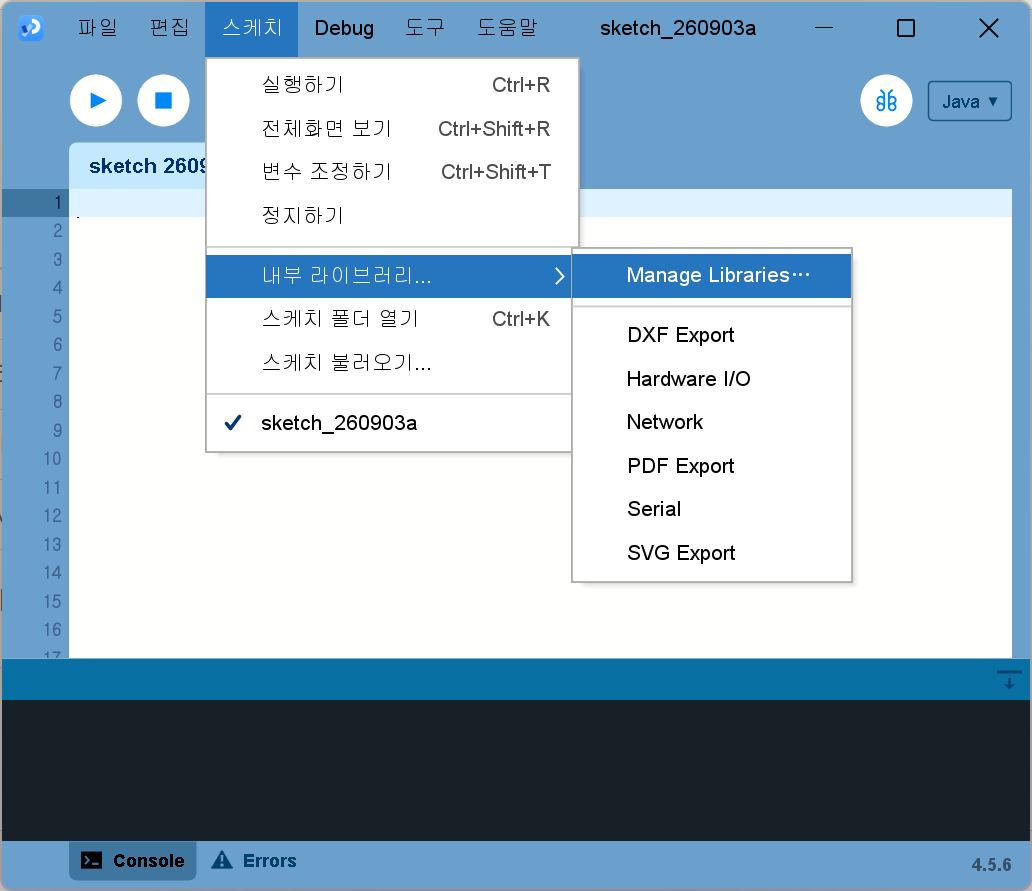
- Open Processing and go to Sketch → Import Library… → Manage Libraries… in the menu. (If your menus are in Korean, it's 스케치 → 내부 라이브러리… → Manage Libraries….)
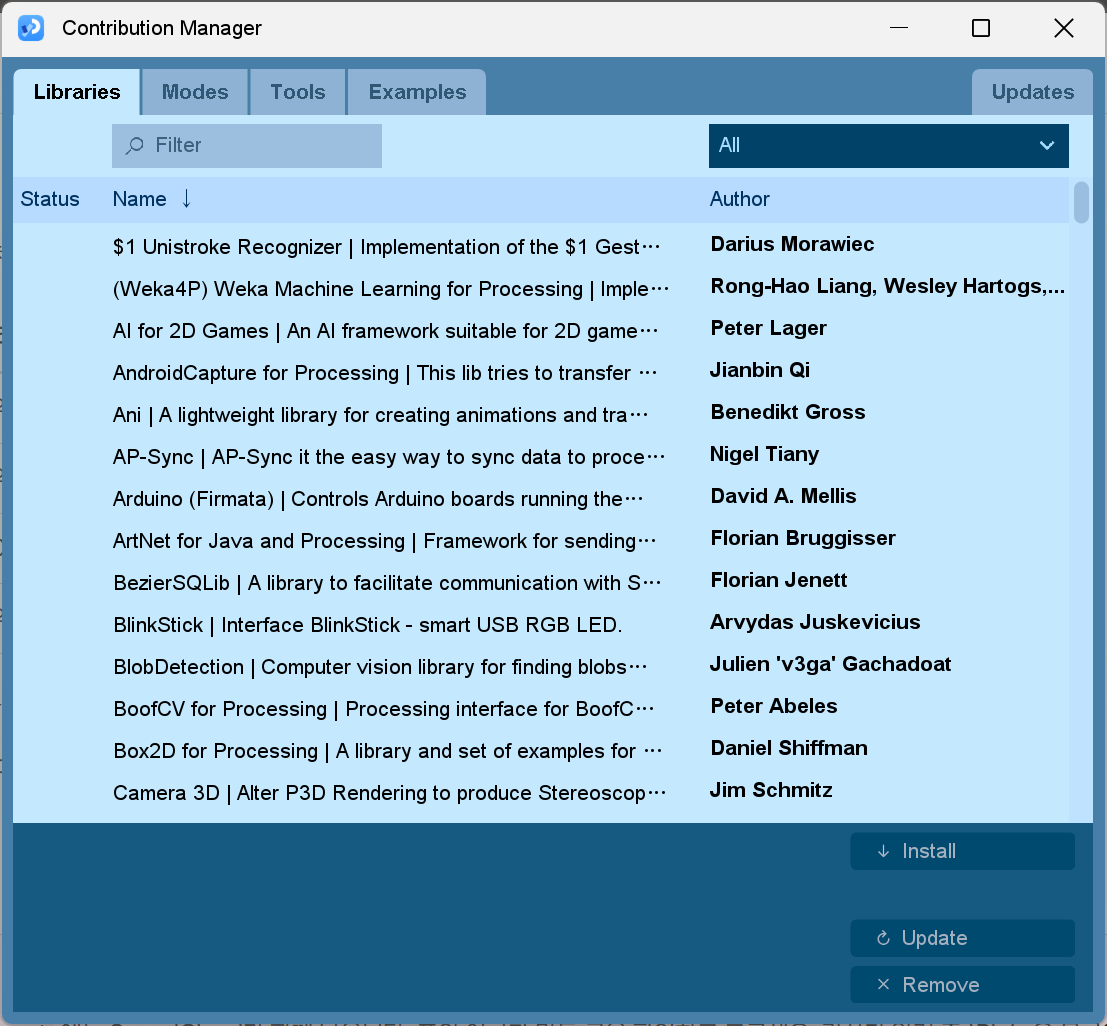
- The "Contribution Manager" window opens on the Libraries tab. Type the search term from the table into the Filter box in the top left.
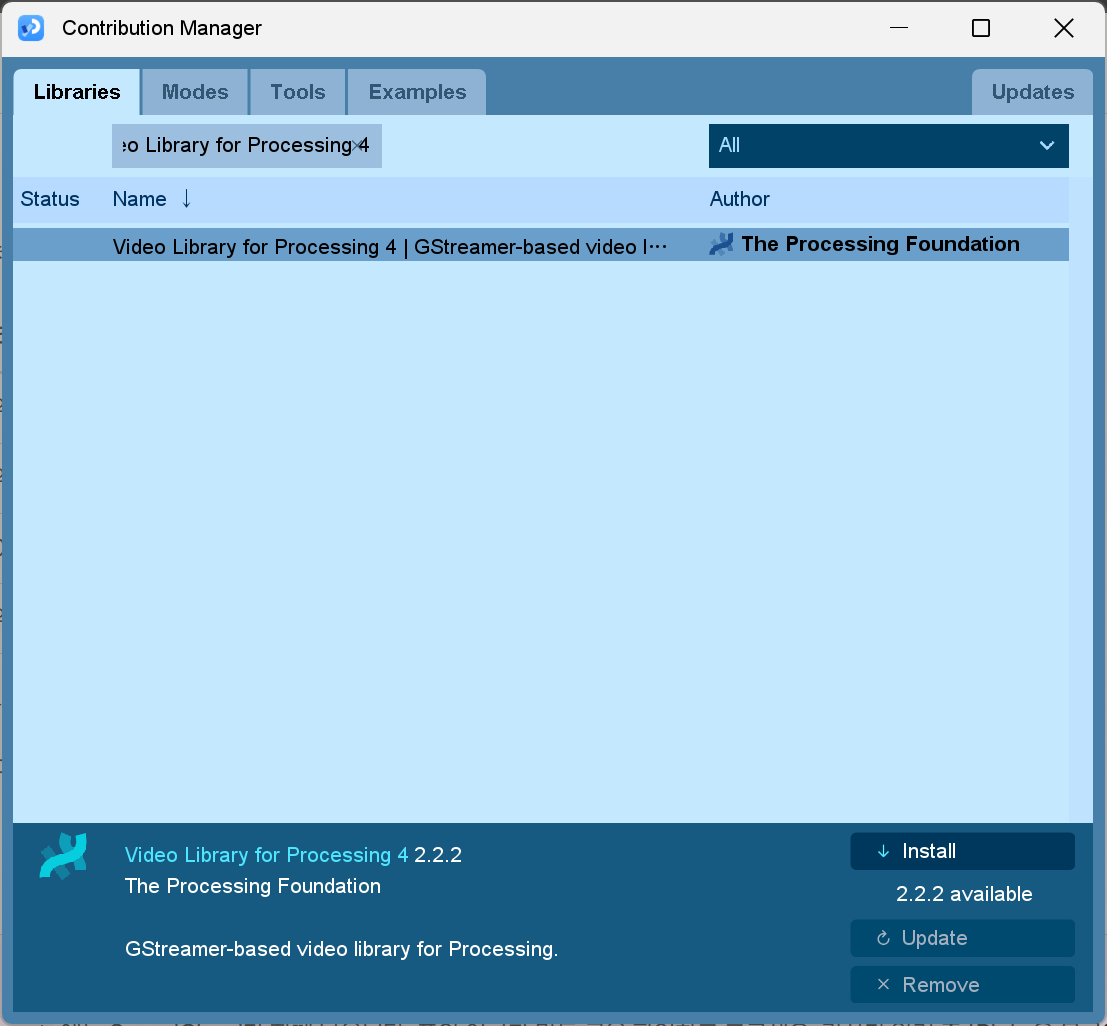
- Click a name once in the remaining list. The name, version, maker and description appear at the bottom of the window. If they match the table, click Install in the bottom right.
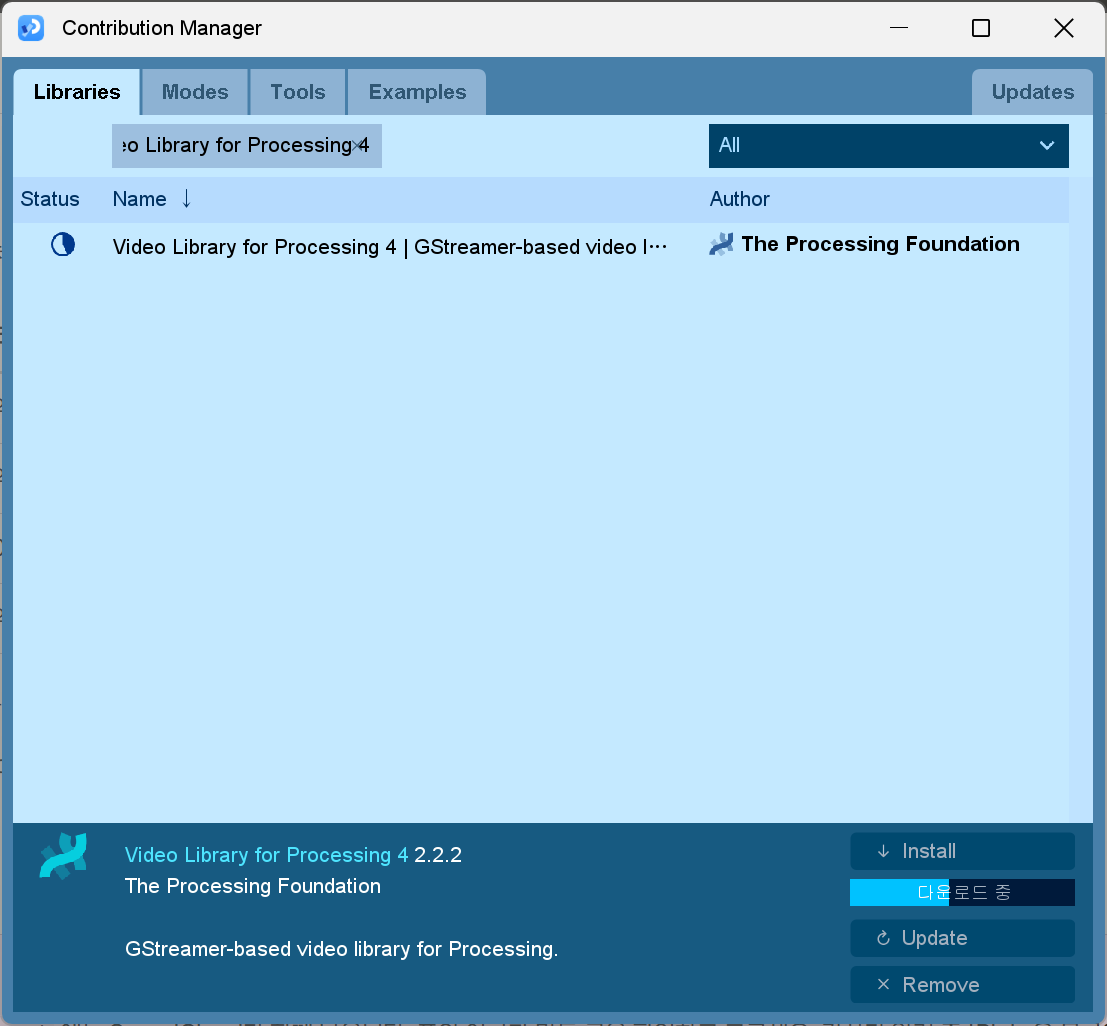
- While it downloads, a blue progress bar and "Downloading" appear under Install. When it's done, a mark stays in the Status column on the left.
- Install all four in turn, then close the window and quit and reopen Processing.
Check that all four work
Open a new sketch with File → New, paste the code below, and press ▶. A small window shows four bulbs. If all four are green, you're done. A red bulb means that library isn't working yet, and the reason is printed in the black area at the bottom (the console). It makes no sound.
// Library check. Actually opens each of the four libraries and lights a bulb.
// A green bulb means ready, a red bulb means not yet. The reason is printed in the console below.
// The text in the window is English because Processing's default font has no Korean. It makes no sound.

import processing.video.*;
import gab.opencv.*;
import blobDetection.*;
import processing.sound.*;

color PAPER = #FAF8F3;
color INK = #14141A;
color GREEN = #8DB34A;
color RED = #E0533F;

String[] names = { "Video", "OpenCV", "Blob", "Sound" };
String[] said = new String[4];    // what each library answered
boolean[] ready = new boolean[4];

void setup() {
  size(520, 320);
  smooth(8);
  surface.setTitle("Library check · OPEN CIRCUIT BUSAN");

  for (int i = 0; i < names.length; i++) {
    try {
      said[i] = open(i);
      ready[i] = true;
      println(names[i] + " ready · " + said[i]);
    } catch (Throwable e) {
      said[i] = "not ready";
      ready[i] = false;
      println(names[i] + " not ready · " + e);
    }
  }
  println(lit() == names.length
    ? "All four are ready"
    : "Please tell the group chat which libraries have a red bulb");
  noLoop();
}

// Actually open each library. If an install is incomplete, it fails here
String open(int i) {
  if (i == 0) {
    return "cameras: " + Capture.list().length;
  }
  if (i == 1) {
    OpenCV cv = new OpenCV(this, 64, 64);
    return org.opencv.core.Core.VERSION + ", " + cv.width + "x" + cv.height;
  }
  if (i == 2) {
    BlobDetection blobs = new BlobDetection(64, 64);
    blobs.setThreshold(0.5);
    return "blobs: " + blobs.getBlobNb();
  }
  SinOsc osc = new SinOsc(this);
  osc.freq(440);
  return "sine 440 Hz";
}

int lit() {
  int n = 0;
  for (boolean b : ready) if (b) n++;
  return n;
}

void draw() {
  background(PAPER);
  textAlign(LEFT, BASELINE);
  textSize(11);
  fill(INK, 120);
  text("LIBRARY CHECK", 44, 58);
  textAlign(RIGHT, BASELINE);
  text("class 3  ·  Processing 4", width - 44, 58);
  stroke(INK, 45);
  strokeWeight(1);
  line(44, 72, width - 44, 72);

  for (int i = 0; i < names.length; i++) {
    float y = 112 + i * 40;
    lamp(62, y, ready[i] ? GREEN : RED);
    textAlign(LEFT, CENTER);
    textSize(15);
    fill(INK);
    text(names[i], 92, y);
    fill(INK, 130);
    text(said[i], 210, y);
  }

  textAlign(CENTER, CENTER);
  textSize(13);
  fill(INK, 190);
  text(lit() + " / " + names.length + " ready", width / 2, height - 40);
}

// The same drawing as the bulbs in the garden sketch
void lamp(float x, float y, color c) {
  noStroke();
  fill(c, 45);
  circle(x, y, 30);
  fill(c, 80);
  circle(x, y, 20);
  stroke(INK, 220);
  strokeWeight(1.4);
  fill(c);
  circle(x, y, 11);
}
To redo the exercise from class
The Session 3 exercise of finding a flashlight and adding a pattern at its position is in Find a flashlight, add a pattern, as step-by-step files. Open them one by one, from Step 1 (opening the webcam) to Step 5 (making it your own).
Look around more
The fastest way to get a feel for what Processing can do is to skim the official examples.
- processing.org/examples: Examples by topic, from drawing and motion to sound, camera and 3D. Each one comes with its code and a running preview, so just clicking through is enough.
- You can open the same examples inside Processing too. Click File → Examples to see the list. Open one, press ▶, and play with it by changing the numbers.
- processing.org/reference: The function dictionary. Look things up here when you're curious about names in the sketches above, like
noise,atan2orpushMatrix.
After the class
If Processing feels right in your hands after Jeongseop Lee's class, hold on to that feeling and push it into your work. We encourage you to take the work you build up and apply for the Processing Foundation Fellowships. The program has supported projects by artists, developers and educators since 2013, and p5.js and the p5.js Editor came out of a fellow's proposal about ten years ago. Through 2025 it selected around ten people each year, from many countries.
The program is being redesigned, so there is no selection in 2026. News about the 2027 fellowships is announced for October 2026, so in the meantime add your name to the mailing list. What you make in Session 3 can be the first material for that application.
When you're stuck
- If it won't run after installing on Windows → restart and try once more. Right after a
.msiinstall, a reboot is sometimes needed. - If the garden window is just black or shows an "OpenGL" error → it's a graphics driver issue. Take a screenshot and post it in the group chat.
- If a Mac only says "Processing can't be opened" with no explanation → check again that the file you downloaded matches your chip (Apple Silicon or Intel).
- If a library install ends with a download error → switch Wi-Fi or click Install again after a moment. Even if a partly downloaded file is left behind, reinstalling overwrites it.
- If the check sketch shows a red line like
The package "gab" does not exist→ that library isn't installed yet. Check its name again in the Contribution Manager. - For anything else, take a screenshot and post it in the group chat. → When you get stuck
Where this comes from
Session 3 was taught by artist Jeongseop Lee. The four libraries are the list Jeongseop Lee asked everyone to install ahead of time. The rest of the install steps, the check sketches and the reading suggestions were put together by Joonhyung Bae.